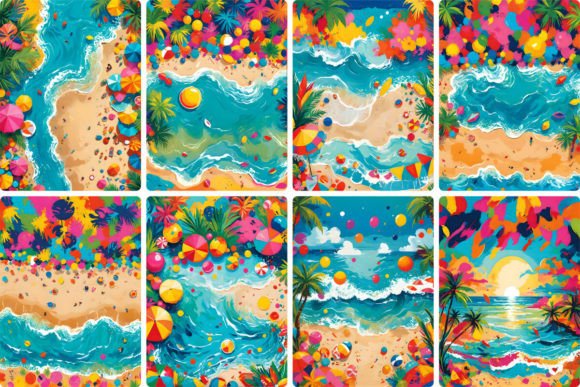
Unlock Your Summer Projects with a Vivid Summer Background Collection
Whether you’re designing a greeting card for an Etsy shop, crafting a custom phone case, or refreshing your blog’s web background, the quality of your starting assets determines the quality of your finished product. A Vivid Summer Background pack promises versatility and punch, but how you select, download, and apply these files makes the difference between a professional result and a frustrating compromise. Many creators, from seasoned small business owners to enthusiastic hobbyists, make predictable errors when handling high-resolution digital papers. Let’s walk through the most common pitfalls so you can make the most of your 8-piece collection.
Mistake 1: Misunderstanding Resolution Specifications
A common misconception is that all digital files labeled “high resolution” are equal. When you see 3000px by 4009px at 300 DPI, it communicates precise capabilities. 300 DPI (dots per inch) is the benchmark for print. An image at 72 DPI may look fine on a screen, but it will appear blurry or pixelated in a printed greeting card or poster.
The dimensions provided—3000 by 4009 pixels—mean you can print at a sizable 10 inches by 13.36 inches without losing quality. This generous canvas covers most standard projects. A common mistake is stretching a smaller background to fit a template, which destroys sharpness. Before you begin designing, verify the file properties. If you plan to use the background for a large poster or an oversized journal cover, this specific resolution holds up exceptionally well.
Mistake 2: Ignoring the Format (JPG vs. PNG)
There is a prevailing myth that JPG files are inherently low quality or unsuitable for professional work. In truth, a high-quality JPG saved at maximum quality settings is ideal for photographic or richly textured backgrounds. The JPG file format used in this collection offers broad compatibility across software like Photoshop, Canva, Affinity, and InDesign.
However, understanding the limitation is key: JPGs do not contain transparency. If you need to overlay a background onto an irregular shape or cut out a specific element, you would need a PNG or TIFF. For full-coverage applications like phone cases, wallpapers, web backgrounds, or posters, JPG is not just acceptable—it is often preferred for its smaller file size and vibrant color reproduction.
Mistake 3: Neglecting Color Accuracy and Print Testing
What you see on your monitor rarely matches exactly what comes out of your printer on the first try. Monitors display in RGB (Red, Green, Blue), while most commercial printers use CMYK (Cyan, Magenta, Yellow, Black). A Vivid Summer Background is likely sRGB, which is the standard for web and modern inkjet printers.
The mistake creators make is skipping a physical test print. They invest time designing a full run of greeting cards only to find the colors are dull or shifted. Practical Advice: Print a single sample on your target paper stock, whether matte, gloss, or cardstock. Adjust your monitor’s brightness or the file’s saturation if needed. The high dynamic range of these summer backgrounds means they are designed to pop, but printer calibration heavily influences the final look.
Mistake 4: Failing to Evaluate the Full 8-Paper Collection
When you purchase a digital asset bundle, it is easy to glance at the preview images and assume you know what is inside. However, smaller visual differences can drastically change a project’s tone. You are receiving 8 Digital Papers in a single zip file. A common workflow error is extracting only the one or two that immediately catch your eye without reviewing the collection’s full range.
If you are building a cohesive product line—for example, a set of summer-themed journals or a unified poster collection—these 8 designs can serve as primary covers, interior endpapers, or marketing mockups. Better Approach: Unzip the file immediately. Create a contact sheet or drag all 8 files into a favorite folder. Evaluate them side-by-side. Look for coordinating colors and themes. This proactive step helps you visualize a complete product suite rather than mismatched items.
Mistake 5: Overlooking the Scale for Specific Templates
Creators often find a beautiful background and try to force it into a template where the focal point is awkwardly cropped or lost. The dimensions 3000px by 4009px are almost perfectly proportional to a 3:4 aspect ratio, which is versatile for various print sizes. Yet, if you are designing a wide banner or a square phone case, cropping is inevitable.
How to Avoid This: Before designing, open your template, for instance a 5.5” x 8.5” book cover. Place the background file and scale it within your design software. Does the main focal area hold up? Does the pattern continue nicely? If the most vibrant part of the image gets cropped out, consider choosing a different paper from the pack or adjusting your layout. The benefit of large files is the flexibility to reposition without pixelation.
Mistake 6: Assuming License Terms Without Verification
This is arguably the most critical mistake for small business owners, freelancers, and entrepreneurs. Many creators assume that purchasing a digital file automatically grants full commercial rights. The product listing states “Thank you for shopping with us,” indicating a standard commercial transaction, but you must verify the specific End User License Agreement (EULA).
Some licenses restrict the number of copies you can sell, prohibit use in logo designs, or require an extended license for print-on-demand (POD) services. Actionable Step: Check the product page or contact the shop owner directly. Clarify whether your use case—such as using the background on 500 greeting cards or 1000 phone cases—requires additional licensing. Avoiding this mistake protects your business from legal friction down the road.
Mistake 7: Poor File Management and Backup
A single zip file containing 8 JPGs is compact and easy to store, but digital assets can be lost, accidentally deleted, or saved over. Freelancers and hobbyists often underestimate the time wasted hunting for lost files. Because these backgrounds are 300 DPI, they are essential assets for your creative toolkit.
Best Practices: Create a dedicated folder structure, such as “Assets > Backgrounds > Summer 2024.” Keep the original zip file backed up in cloud storage like Google Drive or Dropbox, or an external hard drive. Rename the files descriptively if needed but maintain the original master files untouched. This ensures you can always return to the pristine originals for new projects.
Mistake 8: Choosing the Wrong Background for the Application
Not every vivid background is suited for every project. A design that looks fantastic as a web background might overwhelm a small greeting card. A pattern that works well on a poster might not scale down gracefully for a phone case.
Consider the distance between the viewer and the design. For large-format applications like posters or web headers, high-detail, high-contrast patterns work beautifully. For smaller items like greeting cards or journal covers, slightly softer patterns or those with a clear focal point tend to read better. The advantage of an 8-piece collection is variety: you can select subtle designs for small spaces and bolder ones for large canvases.
Making the Most of Your Investment
Digital assets are tools, not just images. The difference between a routine project and an exceptional one often comes down to preparation and understanding your materials. By recognizing the common mistakes around resolution, format, color, licensing, and application, you save time, reduce waste, and produce better work.
When you purchase a pack like this Vivid Summer Background collection, you are buying flexibility, time savings, and professional-grade quality. Verify the technical specs match your project needs, plan your color management strategy, and confirm your usage rights. Whether you are embellishing a blog, creating a line of summer greeting cards, or designing exclusive phone cases, these 8 digital papers provide a rich, cohesive foundation. Store them carefully, use them boldly, and enjoy the efficiency of having high-quality assets ready to go.
Now that you are equipped with these practical insights, your next project is already set up for success.