Lumpi Paper Pack: A Versatile Digital Graphics Collection for Paper Crafts and Beyond
Digital design assets have become essential tools for crafters, small business owners, and content creators who want to produce professional-looking projects without investing heavily in illustration software or graphic design skills. Among the many options available, the Lumpi Paper Pack offers a specific set of pre-made graphics designed to support a wide range of creative applications. This article provides a balanced evaluation of what the pack includes, what it can realistically do, and who might benefit most from adding it to their toolkit.
What Is the Lumpi Paper Pack?
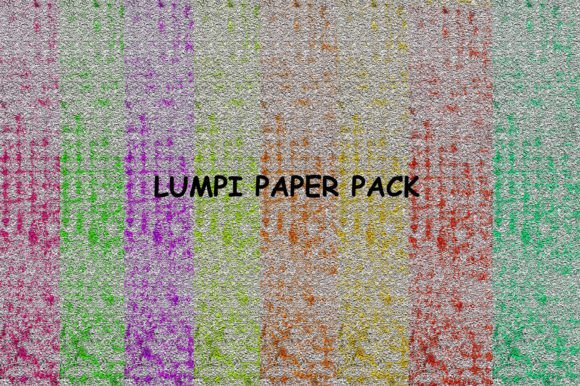
The Lumpi Paper Pack is a digital download containing eight graphic files in JPG format, each with a resolution of 3777 x 3777 pixels at 300 dpi. The files are delivered in a single zipped folder, making them easy to store and transfer. At its core, this pack provides ready-to-use decorative graphics intended for both print and digital projects. The high resolution ensures that prints remain sharp even at larger sizes, while the square format offers flexibility for cropping and scaling across different layouts.
Unlike some design bundles that include editable vector files or layered PSDs, the Lumpi Paper Pack delivers raster JPGs. This means users receive finished images rather than manipulable elements. The tradeoff is simplicity: you can use the graphics immediately without needing specialized software to open or edit them. However, if you require the ability to separate individual design elements or change colors extensively, a vector-based or layered product would offer more control.
Who Might Find This Pack Useful?
The pack targets individuals who enjoy hands-on creative work such as paper crafting, scrapbooking, journaling, and card making. It also appeals to those who need decorative assets for event planning, product labeling, or digital content creation. Because the files are high-resolution and print-ready, they work well for both home printing and professional small-run production.
A few specific user groups may find the Lumpi Paper Pack particularly relevant:
- Hobbyist crafters who want to add polished graphics to notebooks, gift tags, or scrapbook pages without designing from scratch.
- Small business owners who need custom labels, packaging accents, or promotional materials on a budget.
- Event planners looking for cohesive decorative elements for wedding invitations, money envelopes, or birthday party decorations.
- Digital content creators who require aesthetic backgrounds or web graphics for social media, blogs, or digital wallpapers.
Each of these users will have different expectations regarding file format, resolution, and ease of use, which makes it worthwhile to examine the pack's strengths and limitations more closely.
Practical Applications and Benefits
The Lumpi Paper Pack is designed to support a diverse set of projects, and its versatility is one of its main selling points. Below are some of the most common applications where the graphics can add value.
Paper Crafts and Scrapbooking
For those who enjoy assembling physical albums or handmade gifts, the pack provides decorative sheets that can be printed and cut to size. The 3777 x 3777 pixel dimensions translate to approximately 12.5 x 12.5 inches at 300 dpi, which is large enough to cover a standard scrapbook page or to be divided into smaller elements for layered layouts. This eliminates the need to purchase multiple physical paper packs and allows for unlimited reprints.
Card Making and Die-Cutting
Card makers often look for detailed designs that cut cleanly around edges. The high-resolution JPGs in this pack are suitable for use with electronic die-cutting machines, provided the software can import raster images. Because the graphics are not vectors, you may need to trace or convert them for precise cutting. For users comfortable with that extra step, the pack offers a cost-effective source of decorative material.
Event Stationery and Gift Embellishments
Wedding invitations, money envelopes, and birthday decorations all benefit from coordinated design elements. The Lumpi Paper Pack allows you to print consistent graphics across multiple items, creating a unified look for an event or gift set. The JPG format ensures compatibility with most home printers and online print services, so you can produce professional-quality stationery without a large upfront investment.
Digital and Web Use
Beyond traditional paper crafting, the graphics can be used as digital wallpapers, blog backgrounds, or social media visuals. The square format works well for profile images, but you may need to crop or resize for other aspect ratios. The 300 dpi resolution is higher than necessary for on-screen use, which means file sizes are larger, but the quality remains excellent if you want to zoom in or use the graphics for print later.
Considerations and Tradeoffs
While the Lumpi Paper Pack offers clear benefits in terms of versatility and print readiness, there are several factors to consider before making a purchase. A balanced evaluation should address both what the pack includes and what it omits.
File Format Limitations
The JPG format is universally compatible, but it uses lossy compression. This means each save or edit can degrade image quality slightly. For most craft and digital projects, the original files will remain intact if you keep a backup copy. However, if you plan to repeatedly edit and re-save the graphics, a lossless format like PNG or TIFF would be more suitable. Additionally, JPG files do not support transparency, which can be a limitation for projects that require overlapping elements or non-rectangular cutouts.
Number of Files and Variety
With eight files in the pack, users get a focused selection rather than an extensive library. This is adequate for specific projects or themed work, but you may need multiple packs or additional assets if you require a broader range of colors, patterns, or motifs. The square format also means that all images are the same shape, so you will need to crop or combine them for non-square layouts.
No Editable Elements
Because the graphics are flattened JPGs, you cannot separate individual design components, adjust colors, or rearrange layers. If you need that level of flexibility, a product that includes SVG, EPS, or layered PSD files would be a better fit. The Lumpi Paper Pack is best seen as a ready-to-use resource rather than a raw material for extensive customization.
When Is the Lumpi Paper Pack a Strong Fit?
This pack works well when your creative goals align with its design and format constraints. Consider it if:
- You want high-resolution print graphics without needing design software to assemble them.
- Your projects can use square or cropped rectangular images as standalone elements.
- You value consistency across multiple items, such as invitations, envelopes, and decor.
- You are comfortable using JPG files for die-cutting with appropriate conversion steps.
- You prefer a one-time download with unlimited printing rights over ongoing subscription services.
For these scenarios, the Lumpi Paper Pack provides a straightforward, time-saving solution that lets you focus on the crafting or production process rather than design creation.
When Are Alternatives Worth Considering?
In other situations, a different product may better serve your needs. Alternatives are worth exploring if:
- You require transparent backgrounds for layered compositions or product mockups.
- You need to resize elements significantly without losing sharpness, which is easier with vectors.
- You want a larger library of patterns or colors for ongoing, varied projects.
- You prefer to customize colors, remove elements, or adjust layouts extensively.
- You work primarily with digital content that requires smaller file sizes for faster loading.
For those needs, look for design bundles that include SVG, PNG with transparency, or layered files. Subscription-based graphic platforms may also offer more variety, though they typically require ongoing payment rather than a one-time purchase.
Practical Decision-Making Insights
Choosing the right design asset depends on matching the product's strengths to your specific workflow. Here are a few practical questions to help you decide whether the Lumpi Paper Pack aligns with your goals:
- What is your primary output medium? If you intend to print, the 300 dpi JPGs are well-suited. If you work mostly on screen, consider whether the large file sizes and lack of transparency will be an issue.
- How much customization do you need? If you want to apply a consistent graphic across multiple projects without modifying it, the pack works well. If you need to adjust colors or combine elements, look for a more flexible format.
- What is your budget and usage pattern? A one-time purchase like this pack is cost-effective if you have a specific project or a narrow range of uses. For ongoing or diverse creative work, a subscription or larger bundle may offer better long-term value.
- Are you comfortable with basic image editing? Even without advanced software, you can crop, resize, and print JPGs using free tools. However, if you need to remove backgrounds or convert formats, you will need to invest some time learning those skills.
Ultimately, the Lumpi Paper Pack serves a clear niche: it provides high-quality, ready-to-print decorative graphics for crafters and small-scale producers who value simplicity and consistency. It is not a substitute for a full design library or vector toolkit, but it does deliver on its promise of versatile charm for paper-based and digital projects.
Final Considerations
When evaluating any design resource, it helps to look beyond the feature list and consider how it fits into your actual creative process. The Lumpi Paper Pack is a focused product that excels in specific applications, particularly those involving print-based paper crafts, event stationery, and straightforward digital backgrounds. Its limitations in editability and format variety are balanced by its ease of use and professional output quality.
If your projects align with what the pack offers, it can be a practical addition to your creative toolkit. If your needs require more flexibility or a broader selection, exploring alternatives that provide vector or layered assets may save you time in the long run. Either way, understanding the tradeoffs allows you to make a more informed choice and get the most out of whatever resources you decide to use.