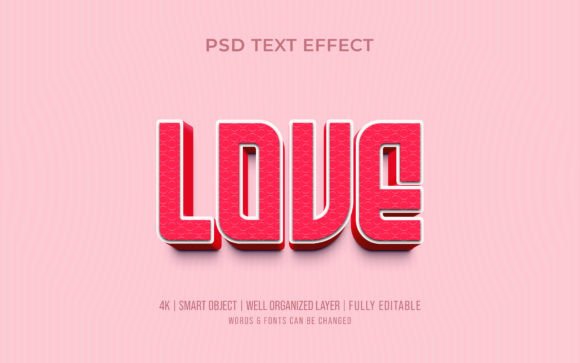
Creative Love Editable 3D Text Effect: How to Use It in Your Design Projects
In the world of digital design, typography is far more than just letters on a page. It's a powerful tool for expression, branding, and storytelling. Among the most captivating typographic techniques is the 3D text effect — a style that adds depth, dimension, and life to words. The Creative Love Editable 3D Text Effect is a premium design resource that makes achieving this look incredibly simple, even for beginners. This article explores what this 3D text effect is, how it works, why it matters, and how you can use it to elevate your creative projects.
What Is a 3D Text Effect and Why Does It Matter?
A 3D text effect simulates three-dimensional depth on a two-dimensional surface. Instead of flat, single-layer letters, the text appears to have thickness, shadows, highlights, and sometimes even reflections or beveled edges. This technique grabs attention, adds a tactile quality, and makes your message stand out in a crowded visual landscape.
- Branding and logos — creating memorable, dimensional wordmarks.
- Social media graphics — making quotes, titles, and headlines pop.
- Print materials — posters, flyers, and invitations that need a premium feel.
- Video thumbnails and banners — increasing click-through rates with eye-catching text.
- Product packaging — adding a sense of quality and craftsmanship.
The Creative Love Editable 3D Text Effect is designed to give you this professional-grade dimensional look without requiring advanced 3D modeling skills. It's built for Adobe Photoshop CC and comes fully editable, so you can customize every aspect.
What's Included in the Creative Love 3D Text Effect Package?
📁 PSD Photoshop File (Fully Layered)
The main file is a PSD (Photoshop Document) with smart objects and organized layers. Every element — from the base text layer to the 3D extrusion, highlights, shadows, and background effects — is separated and labeled. This structure makes editing intuitive, even for those new to Photoshop.
🖼️ HQ JPG File
📄 Help File.txt
✨ Additional Features
- 300 DPI resolution — print-ready quality for both digital and physical output.
- Smart object layers — you simply double-click the smart object, type your own text, save, and the 3D effect updates automatically.
- Everything is editable — colors, gradients, lighting angles, shadow depth, and text content are all customizable.
- Adobe Photoshop CC version — optimized for the latest features but compatible with many earlier versions.
- Free font included or recommended — the effect uses a specific font that you can download for free, ensuring your result matches the preview.
How Does a 3D Text Effect Actually Work in Photoshop?
- Base text layer — your actual word or phrase, in a clean vector format.
- Extrusion layer — duplicates of the text shifted slightly to create the illusion of depth (like a 3D block).
- Lighting and shading — gradients, soft brushes, or layer styles that simulate light hitting the edges.
- Highlights and reflections — subtle white or light-colored shapes that give a glossy, metallic, or shiny surface.
- Drop shadow and ambient shadow — grounding the text against the background.
In the Creative Love pack, these elements are already built and linked to smart objects. When you edit the smart object, Photoshop automatically re-renders the 3D appearance with your new text. This is a huge time-saver and eliminates the guesswork.
Example: Imagine you're creating a Valentine's Day promotion. You open the PSD file, double-click the smart object layer, type "Love" or "Sweetheart," adjust the color to pink or red, and the entire 3D effect updates instantly. You can then export a high-res JPG or PNG for your flyer, social post, or website banner.
Who Should Use This 3D Text Effect?
- Graphic designers — save hours of manual 3D rendering and focus on creative composition.
- Social media managers — create consistent, attention-grabbing quote graphics or themed posts.
- Small business owners — design professional-looking logos, sale banners, and event flyers without hiring a designer.
- Hobbyists and beginners — learn layer organization, smart objects, and text styling by exploring a professional template.
- Print-on-demand sellers — produce mockups for t-shirts, mugs, and posters with dimensional text.
How to Use the Creative Love Editable 3D Text Effect: A Beginner's Walkthrough
Step 1: Download and Install the Free Font
Step 2: Open the PSD File in Adobe Photoshop CC
Make sure you have Photoshop CC (or at least CS6 with smart object support). Open the Creative Love 3D Text Effect.psd file. You'll see the example text rendered in full 3D glory.
Step 3: Edit the Smart Object
In the Layers panel, locate the smart object layer (it will have a small grid icon on the thumbnail). Double-click it. A new window opens with the text layer inside. Use the Type Tool (T) to select the existing text and type your own word or phrase. Adjust the font size if needed. Then press Ctrl+S (or Cmd+S on Mac) to save. Close that window.
Step 4: Customize Colors and Effects
- Change the color of the extrusion by selecting its layer and using Hue/Saturation or Color Overlay.
- Adjust the shadow opacity or angle by moving the shadow layer or modifying its layer style.
- Tweak the highlight brightness with a simple opacity slider.
Step 5: Save and Export
Once you're happy, save the PSD to keep the editable version. For sharing or printing, go to File → Export → Export As and choose PNG or JPG. The 300 DPI ensures your output is crisp at any size.
Common Misunderstandings About 3D Text Effects
- "3D text requires 3D software." Not at all. With a layered PSD using smart objects, you can achieve convincing 3D results entirely within Photoshop, without touching Blender, C4D, or any 3D application.
- "Editable means the file is low quality." Actually, editable files are often higher quality because they preserve layers and original data, not just a flattened image. This pack is 300 DPI and uses vector smart objects.
- "Only experts can customize it." The smart object workflow is designed for all skill levels. The included help file and the creator's offer of support make it beginner-friendly.
- "You need the exact same font." While matching the font gives the exact preview look, you can use any font you like. The 3D effect will adapt to your chosen typeface, though results may vary with very thin or very thick fonts.
Where Can You Use the Creative Love 3D Text Effect?
- Valentine's Day marketing — "Love," "Be Mine," "Sweetheart" rendered in pink and gold for social posts, email headers, or in-store signage.
- Wedding invitations and decor — use the couple's names or "Mr & Mrs" in a romantic 3D style for save-the-dates, table cards, or backdrop text.
- Branding for a boutique or salon — create a dimensional logo that feels premium and personal.
- YouTube thumbnails — make channel titles or video headline text pop off the screen.
- Motivational quote posters — combine 3D text with a complementary background for an inspiring wall art piece.
- Etsy product mockups — show your text-based products (mugs, pillows, prints) with realistic dimensional text.
Why This Resource Reflects High E-E-A-T Standards
When evaluating digital products, especially design assets, it's important to consider Experience, Expertise, Authoritativeness, and Trustworthiness (E-E-A-T). The Creative Love Editable 3D Text Effect meets these criteria in several ways:
- Experience: The product comes from a creator who understands real-world design workflows, offering smart objects and a help file that solve common pain points.
- Expertise: The layered PSD structure, 300 DPI resolution, and CC compatibility show technical knowledge of Photoshop and print production.
- Authoritativeness: The included files and clear documentation establish the creator as a reliable source for design resources.
- Trustworthiness: The offer to help with customization ("Please feel free to ask me if you need any help") demonstrates a commitment to customer success, not just selling a file.
Pro Tips for Maximizing the 3D Text Effect
- Layer multiple 3D text blocks — copy the group of layers and create a composition with several words at different depths and angles.
- Adjust the lighting direction — move the highlight and shadow layers to simulate light coming from a specific side, matching your background image.
- Use gradient overlays — apply a gradient to the extrusion layer for a smooth metallic or duotone effect.
- Combine with textures — place the 3D text over a brick, wood, or marble background and use blending modes to integrate it naturally.
- Scale carefully — because the effect uses layer styles and pixel-based shadows, extreme scaling can soften details. Use smart objects to resize proportionally.
How Does This Compare to Other 3D Text Methods?
- Vs. Photoshop's 3D workspace: The 3D workspace is powerful but resource-intensive and has a steep learning curve. The smart object method is faster, lighter, and more intuitive.
- Vs. manual layer stacking: Manually duplicating text layers and shifting them can produce a 3D look, but it takes time and experimentation. This pack gives you a polished, pre-tuned system.
- Vs. layer styles only: Bevel & Emboss adds a faux-3D effect, but it can look flat and overused. The Creative Love effect includes real extrusion and shading for a more authentic dimensional feel.
Final Thoughts: Unlock Dimensional Typography with Ease
The Creative Love Editable 3D Text Effect is more than just a Photoshop file — it's a gateway to professional, eye-catching typography that can elevate any project. Whether you're a seasoned designer looking to save time or a beginner eager to create stunning text without the technical overhead, this resource delivers.
Creative Love Editable 3D Text Effect — PSD, JPG, Help File, 300 DPI, Smart Object, Adobe Photoshop CC, Free Font.
Ready to add dimension to your next project? This pack has you covered.