Best Dad Ever SVG Files – What You Get & How to Make the Most of Your Digital Download
Few phrases carry as much warmth and appreciation as "Best Dad Ever." Whether you're creating a custom gift for Father's Day, a birthday surprise, or just a heartfelt keepsake, this classic sentiment is a go‑to for DIYers and crafters alike. But if you're new to the world of digital crafting, you might wonder: What exactly is an SVG file? What does "word by layer" mean? And why does a single download come with five different file formats?
This article walks you through everything you need to know about the Best Dad Ever SVG digital download—what each file does, how to use them with popular cutting machines and design software, and creative ways to turn this simple phrase into a memorable project. Whether you're a beginner or an experienced maker, you'll walk away with a clear understanding of how to get the most out of your purchase.
What Is a "Word by Layer" SVG File?
A word by layer SVG file is a cut‑ready design where each letter or word is separated into its own individual piece (or layer). Instead of the entire phrase being one solid shape, the design is broken apart so that you can use different colors, materials, or finishes for each element.
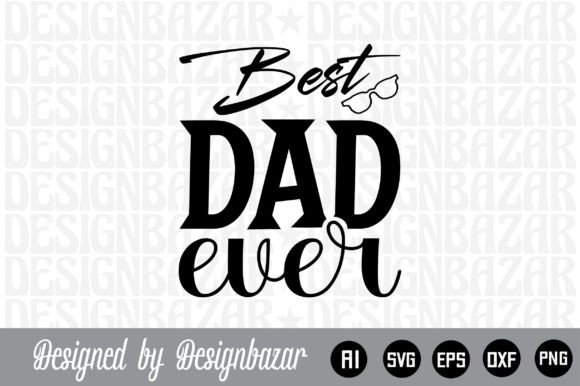
For example, in a "Best Dad Ever" word‑by‑layer file, the words "Best," "Dad," and "Ever" may each be a separate layer. You might cut "Dad" from a bold navy vinyl, "Best" from a soft gold, and "Ever" from a cheerful red—allowing you to stack or arrange them for a dimensional, professional look.
This layered approach gives you:
- Creative control – Mix and match colors, textures, and materials for each word.
- Easy alignment – Each piece fits together like a puzzle, making assembly straightforward.
- Versatility – Use the same design for a T‑shirt, a mug, a sign, or a card by adjusting layer colors.
Word‑by‑layer SVGs are especially popular with Cricut, Silhouette, and other electronic cutting machines because they let you produce multi‑color projects without needing to weed and reassemble a single complex design.
What's Inside Your Digital Download Package
When you purchase the Best Dad Ever SVG digital download, you receive a single .zip file containing five different file formats. Each format serves a specific purpose, and having all of them ensures you can work with virtually any design software or cutting machine. Here's what you get and exactly what each file does:
1. AI File – Adobe Illustrator Source File
The .ai file is the native Adobe Illustrator format. It preserves all layers, text, and vector paths exactly as the designer created them. If you use Illustrator, this file lets you tweak colors, resize elements, and even edit the font or spacing before exporting to other formats. Think of it as the "master file" for the design.
2. SVG File – Scalable Vector Graphic (Word by Layer)
The .svg file is the heart of your download. SVG stands for Scalable Vector Graphic, meaning it can be resized to any dimension without losing quality. This file is specifically designed as a word‑by‑layer cut file, so each word (or letter) is separated into its own layer. You'll use this with Cricut Design Space, Silhouette Studio, Inkscape, or any other vector‑based cutting software. It's the go‑to format for most digital crafting projects.
3. PNG File – 300 DPI with Transparent Background
The .png file is a high‑resolution raster image (300 DPI) with a transparent background. Transparent PNGs are perfect for print‑on‑demand projects, digital scrapbooking, sublimation printing, or any use where you need the design to sit on top of a background image or patterned paper. Because it's 300 DPI, the print quality is crisp and professional.
4. EPS File – Editable Vector File
The .eps file (Encapsulated PostScript) is a widely compatible vector format that works with many design programs, including older versions of Adobe software, CorelDRAW, and even some free alternatives. EPS files retain the vector properties of the design, so you can scale them up or down without pixelation. This file is a great backup if the SVG behaves unexpectedly in a particular program.
5. DXF File – Compatible with Cricut, Silhouette, Inkscape, and More
The .dxf file is a CAD‑oriented vector format that is widely supported by cutting machines and design software. DXF files are especially handy for Cricut Design Space and Silhouette Studio (including older versions) because they import cleanly and maintain the layer structure. If you run into compatibility issues with SVG, the DXF file often works seamlessly.
Important: This is a digital download only. No physical product is shipped. After purchase, you download the .zip file, extract its contents, and use them immediately on your computer.
Step 1: Download and Unzip
After your purchase, you'll receive a link to download a .zip file. Save it to your computer, then right‑click (or double‑click on Mac) to unzip/extract the contents. Inside you'll see the five files listed above.
Step 2: Choose the Right File for Your Software
- Cricut Design Space: Import the .svg file (or .dxf if needed). The word‑by‑layer structure will appear as separate layers. Ungroup them to assign different colors or materials.
- Silhouette Studio: Use the .svg or .dxf file. The layers will import as separate objects.
- Adobe Illustrator: Open the .ai file for full editability. You can also open the .svg or .eps files.
- Inkscape (free): Import the .svg file. All layers will be available.
- Print‑on‑demand or sublimation: Use the .png file with its transparent background for placing on shirts, mugs, or other items.
Step 3: Customize and Cut
Once imported, you can resize the design to fit your project—whether it's a 4‑inch decal for a coffee mug or a 12‑inch sign for the wall. Because the file is vector‑based, it will stay crisp at any size. Use the layer structure to assign different colors to each word, then send the design to your cutting machine.
Creative Project Ideas for "Best Dad Ever"
A "Best Dad Ever" design is incredibly versatile. Here are just a few ways to use your digital download:
- T‑shirt or onesie: Cut heat‑transfer vinyl (HTV) in three colors and press onto a blank shirt. The layered words create a professional, store‑bought look.
- Wood sign: Use adhesive vinyl to create a stencil for painting or etching. Or cut the layered words from different colored vinyl and apply directly to a painted wood board.
- Mug or tumbler: Apply permanent vinyl in contrasting colors. The word‑by‑layer approach lets you make each pop.
- Greeting card: Cut the design from cardstock and glue the layers onto a blank card base. Add a handwritten message inside.
- Framed wall art: Use the .png file to print the design on photo paper or cardstock, then frame it for a ready‑to‑hang gift.
- Personalized gift tag: Scale down the design and cut it from vinyl or cardstock to attach to a wrapped present.
Common Misunderstandings About SVG Digital Downloads
If you're new to digital crafting, a few points can cause confusion. Let's clear them up:
- "I need a physical product shipped to me." No, this is a digital download only. You receive files, not a printed item. Think of it like buying a font or a template—you get the digital assets to create the physical item yourself.
- "One file is enough; why do I need five?" Each file format is designed for a different software or workflow. The SVG and DXF are best for cutting machines, the AI and EPS are for vector editing, and the PNG is for print projects. Having all five ensures you can work in any environment without compatibility issues.
- "Word by layer means I can't resize it." Actually, because these are vector files, you can resize them freely. The "word by layer" refers to the structure (each word is separate), not a limitation on scale.
- "I need to be a professional designer to use these files." Not at all. Basic knowledge of your cutting machine's software is enough. For Cricut and Silhouette, the import process is straightforward and well‑documented.
Why Digital Downloads Are a Smart Choice for Crafters
Digital SVG files like this "Best Dad Ever" set offer several advantages over buying pre‑made physical products:
- Instant access – No shipping wait times. You can start crafting within minutes of purchase.
- Unlimited reuse – The files are yours to use on multiple projects (for personal use). You can make gifts for every dad you know.
- Customization – Because you control the colors, size, and material, every finished item is unique to you.
- Cost‑effective – One digital file can produce dozens of physical items, each costing only the materials (vinyl, blank shirts, etc.).
- Professional results – High‑quality vector files ensure crisp, clean cuts and prints every time.
Tips for Getting the Best Results
- Check your machine's compatibility – Most modern machines accept SVG and DXF, but older software may prefer one format over another. If you have a Cricut Explore Air 2, SVG is usually best; for older Silhouette models, DXF may be more reliable.
- Use the PNG for print projects – If you're doing sublimation or print‑and‑cut with a white background, the PNG file saves you from having to remove backgrounds manually.
- Test with scrap material – Before cutting your final vinyl or cardstock, run a test cut with inexpensive material to confirm sizing and alignment.
- Keep the layers organized – When you import the SVG into Design Space or Silhouette Studio, rename the layers so you know which word is which. This makes color changes easier.
- Resize strategically – If you need to make the design much larger or smaller, do it in your cutting software rather than in a separate image editor, to preserve the layer structure.
Final Thoughts
The Best Dad Ever SVG digital download is more than just a set of files—it's a starting point for countless heartfelt, creative projects. By understanding the purpose of each included format (AI, SVG, PNG, EPS, DXF) and how to use them in your workflow, you unlock the full potential of digital crafting.
Whether you're making a simple decal for a coffee mug or an elaborate layered sign for a dad who deserves the world, the word‑by‑layer structure gives you the flexibility to produce stunning, customized results. And because this is a digital product, you can create and share your love again and again—without ever running out of stock.
So go ahead, download your files, fire up your cutting machine, and turn that simple sentiment into something truly special. After all, "Best Dad Ever" isn't just a phrase—it's a feeling, and now you have the tools to express it in a dozen different ways.